
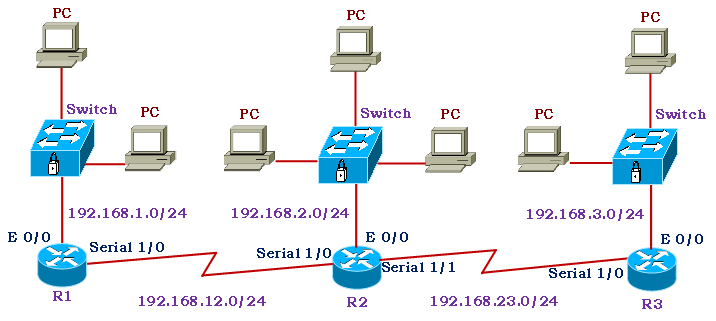
Switch Functionality:
- Devices on a same network are connected by the switch.
- Switches are commonly referred to as Layer 2 devices since they forward packets using a frame’s Layer 2 address.
- The Media Access Control (MAC) address is a device’s Layer 2 address on an Ethernet segment.
- The switches link the PCs in the LAN segments to one another, according to the diagram. Additionally, the switch enables PCs to connect to the router.
- The PCs are connected to other networks via a router.
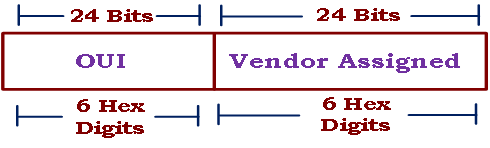
- The MAC Address is the address that is given to the NIC.
- The OUI and a Unique Vendor given address are its two components.
- IEEE assigns the vendor an Organizationally Unique Identifier (OUI).
- Every NIC/interface that the vendor produces is given a unique identification.
- It is written in hexadecimal. A MAC address could be 0001.AA00.0001, 00:01:AA:00:00:01, or 00-01-AA-00-00-01.AA stands for the OUI, and 00.0001 is the device’s unique vendor-assigned identity.
MAC Address Table:
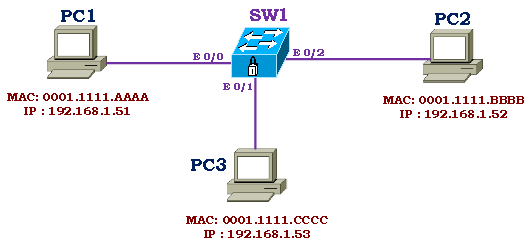
- The switch uses an automated process called MAC Learning to create and manage a table called MAC address Table.
- The Switch port is linked to a particular MAC Address via the MAC Address table.
- By examining a frame’s Source MAC address, the switch determines the MAC address to be assigned to a port. It will learn the MAC address and save it in the MAC Address Table if a frame arrives from a port that it is unfamiliar with. This mechanism is used by the switch to learn the network topology.
- By examining the destination MAC address, the switch will advance the frame.
- Only the port linked with that MAC address will receive the frame.
- It will flood all of the switch’s ports if the MAC address is unknown.
- Every broadcast and multicast frame is constantly overloaded.
Switching Frames Structure:
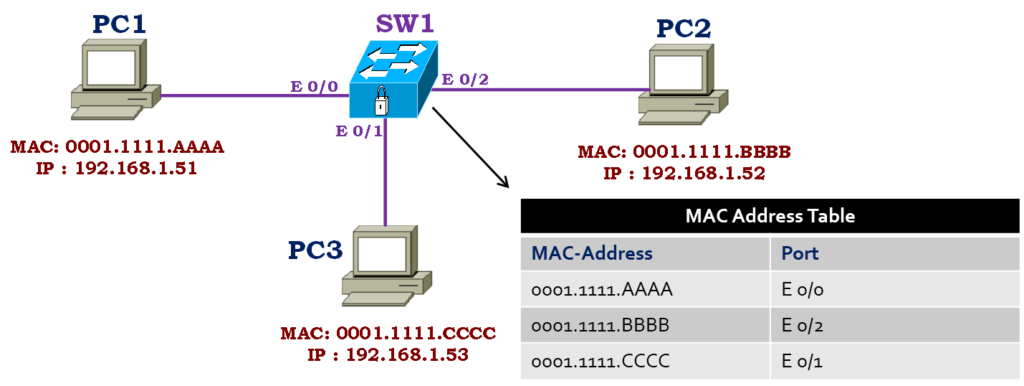
Assume for the moment that the MAC Address table contains no MAC addresses for the switch.
- PC1 wishes to speak with PC2. PC1 sends a frame to the switch via port E 0/0.
- The frame’s Source MAC address is examined by the switch.
- The MAC Address and the corresponding port will be kept in the MAC Address Table.
- The destination MAC Address will now be compared to the MAC Address table by the switch.
- The switch will flood the frame to every port as the MAC address is not in the MAC address table.
- After receiving the frame, PC2 will reply with its MAC address as the source and PC1’s MAC address as the destination. After learning the new MAC address, the switch will record it in the MAC address table. Since the switch already knows the MAC address from the first communication, it will only forward the frame on Port E 0/0.
- Using the same method, the switch will discover every MAC address on the network. The switch will forward frames to the designated destination ports using the MAC Address Table.