
Introduction to IP Addressing:
One of the key ideas in computer networking is IP addressing. An IP address is necessary for all networked devices to communicate with one another, including computers, servers, printers, routers, switches, mobile phones, and Internet devices. Devices cannot recognize one another or communicate over a network or the internet without IP addressing.
An IP address functions similarly to a residential address. Networks utilize IP addresses to send and receive data packets between devices, much like a courier uses a home address to deliver packages.
What is an IP Address
Every device linked to a network is given a unique numerical identity called an IP (Internet Protocol) address.
Example of an IPv4 address:
192.168.1.10
Example of an IPv6 address:
2001:0dc8:61b4:0000:0000:8a2e:0370:7254
IP addresses help devices:
- Recognize one another
- Communication within networks
- Get online
- Properly route traffic
- Control the connectivity of the network
Types of IP Addressing:
IP addressing comes in two primary versions:
1- IPV4 Addressing
2- IPV6 Addressing
1. IPV4 Addressing
The most popular IP addressing scheme is IPv4.
Characteristics of IPv4
- 32-bit address
- Written in decimal notation
- Split into four octets
- The range of each octet is 0–255.
- Approximately 4.3 billion addresses in total
Example:
192.168.10.5
Structure of IPv4:
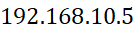
Each part separated by dots is called an octet.
2. IPv6 Addressing
Because IPv4 addresses are running out, IPv6 was created.
- IPv6’s characteristics
- 128-bit address
- In hexadecimal format
- Offers an enormous quantity of addresses
- Improved routing effectiveness and security
- Accommodates contemporary internet technologies
Benefits of IPv6
- Greater address space
- Enhanced safety
- Improved performance
- A more straightforward network setup
- Effective routing
IP addresses, both public and private:
Public IP Address
An Internet service provider (ISP) assigns a public IP address, which may be accessed online.
For instance:
103.25.45.100
Uses
• Communication via the internet
• Website hosting
• Access to a VPN
• Servers for emails
Private IP addresses:
Private IP addresses are only used within local networks; they are not able to access the internet directly.
Private IP Ranges
| Class | Private IP Range |
| Class A | 10.0.0.0 – 10.255.255.255 |
| Class B | 172.16.0.0 – 172.31.255.255 |
| Class C | 192.168.0.0 – 192.168.255.255 |
Common Uses
- Networks in offices
- WiFi at home
- Internal servers
- CCTV systems
- LAN settings for enterprises
Static and Dynamic IP Addressing
Static IP Address
A static IP address doesn’t change on its own; it stays fixed.
Benefits
- Consistent connectivity
- Perfect for servers
- More convenient remote access
- More suitable for DNS hosting Common Uses
- Web servers
- Servers for emails
- CCTV systems
- Devices for networks
Dynamic IP Address
A DHCP server automatically assigns a dynamic IP address.
Benefits
- Simple administration
- Automatic setup
- Effective use of IP
- Less Administrative Work
Common Uses
- Mobile gadgets
- Visitor networks
- Internet users at home
- Classes of IPv4 Addressing
- IPv4 addresses are divided into different classes.
| Class | Starting Range | Default Subnet Mask | Usage |
| A | 1 – 126 | 255.0.0.0 | Large networks |
| B | 128 – 191 | 255.255.0.0 | Medium networks |
| C | 192 – 223 | 255.255.255.0 | Small networks |
| D | 224 – 239 | N/A | Multicasting |
| E | 240 – 255 | N/A | Research |